
Lesson 4 gave the study planner a working model and useful calculations. Every task, however, was created by the programmer. Real input behaves differently. Someone leaves the title empty, pastes a duration containing spaces, or types twenty instead of 20. The next useful step is to make that boundary explicit. We will accept raw text, explain why unsuitable input cannot become a task, and keep the calculations from earlier lessons working with dependable values.
The practical habit to develop here is to slow down before converting input. A program that accepts everything may appear friendly during a demonstration, then become difficult to trust when its totals are wrong. Good validation is a conversation with the person using the program. It names the problem, preserves the distinction between different failures, and offers a clear next action. This lesson uses fixed input samples so every case is repeatable in Kotlin Playground.
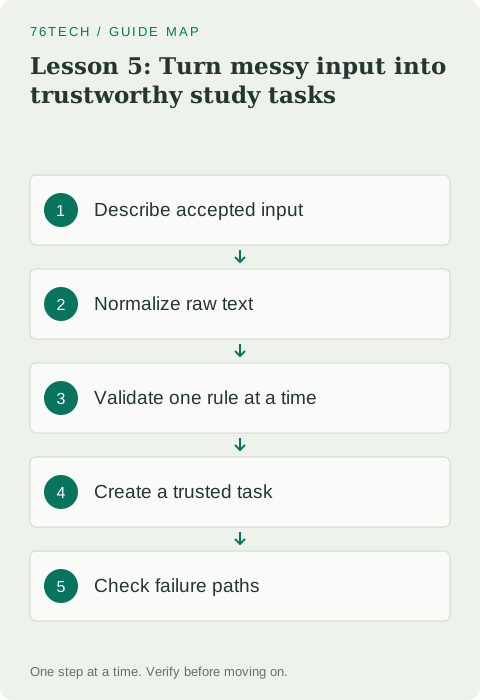
Start from the planner you already understand
Keep the title, minutes, and done properties from lesson 4. A valid task still has a nonblank title and a positive duration. The new function sits before that model: it receives a nullable title and nullable duration text. Nullable inputs represent values that were not supplied at all. An empty string is a supplied value with no characters, while a string containing spaces becomes empty after trimming. These cases can share a user message without pretending their raw values were identical.
For this training planner, choose a duration range of one to 240 minutes. That upper bound is a product decision for one study session, not a Kotlin restriction. Writing it down matters because otherwise the constructor and the input function might disagree. If a later exercise allows longer sessions, change both protections and the corresponding checks together. Rules that exist only in somebody's memory tend to drift as the program grows.
Separate the outcome from the task
An input attempt has two useful outcomes: a valid StudyTask or feedback explaining why creation failed. A small TaskInput result carries those alternatives. It has a private constructor and two named factory functions so callers cannot casually construct a result containing both a task and an error. This is a deliberately modest design. Later, the existing sealed-state practice article can teach a stronger representation with a closed hierarchy of alternatives.
Do not return null for every failure and print the same vague sentence afterward. The person entering a duration needs different advice from someone who forgot a title. We also avoid returning a fake task with zero minutes, because that would push uncertainty into every calculation. Once the boundary accepts an input, the rest of the planner should not need to wonder whether its duration secretly means invalid input.
Run the complete input example
Replace the Playground editor with this complete program. It is independent of the earlier files and uses only the Kotlin standard library. Read each early return before running it, then predict which message each invalid sample will produce.
data class StudyTask(
    val title: String,
    val minutes: Int,
    val done: Boolean = false
) {
    init {
        require(title.isNotBlank()) { "Title must not be blank" }
        require(minutes in 1..240) { "Minutes must be from 1 to 240" }
    }
}

class TaskInput private constructor(
    val task: StudyTask?,
    val message: String?
) {
    companion object {
        fun accepted(task: StudyTask): TaskInput = TaskInput(task, null)
        fun rejected(message: String): TaskInput = TaskInput(null, message)
    }
}

fun parseTask(rawTitle: String?, rawMinutes: String?): TaskInput {
    val title = rawTitle?.trim().orEmpty()
    if (title.isBlank()) return TaskInput.rejected("Enter a task title")

    val text = rawMinutes?.trim().orEmpty()
    if (text.isEmpty()) return TaskInput.rejected("Enter a duration")
    val minutes = text.toIntOrNull()
        ?: return TaskInput.rejected("Use whole minutes, such as 25")
    if (minutes !in 1..240) {
        return TaskInput.rejected("Choose between 1 and 240 minutes")
    }
    return TaskInput.accepted(StudyTask(title, minutes))
}

fun main() {
    val accepted = parseTask("  Practice functions  ", " 25 ")
    val task = accepted.task
    check(task != null)
    check(task.title == "Practice functions")
    check(task.minutes == 25)
    check(accepted.message == null)
    println("Accepted: ${task.title}, ${task.minutes} minutes")

    val failures = listOf(
        parseTask(null, "25"),
        parseTask("Read Kotlin", null),
        parseTask("Read Kotlin", "twenty"),
        parseTask("Read Kotlin", "0")
    )
    val expected = listOf(
        "Enter a task title",
        "Enter a duration",
        "Use whole minutes, such as 25",
        "Choose between 1 and 240 minutes"
    )
    failures.forEachIndexed { index, result ->
        check(result.task == null)
        check(result.message == expected[index])
        println(result.message)
    }
    check(parseTask("Short session", "1").task?.minutes == 1)
    check(parseTask("Long session", "240").task?.minutes == 240)
    check(parseTask("Too long", "241").task == null)
    println("Input checkpoint passed")
}
The first line reports Practice functions and 25 minutes. Four feedback lines follow, in the order shown in expected. The final line confirms that all checks passed, including the accepted endpoints and the rejected value above the maximum. If execution stops earlier, examine the first failed check. That is evidence about a specific rule, and it is more useful than adding another print statement somewhere unrelated.
Normalize without silently changing meaning
Trimming the outside of a title is a reasonable convenience: leading and trailing spaces rarely identify the task itself. We do not remove spaces inside the title, change its case, or rewrite its wording. For duration text, trimming makes 25 surrounded by spaces acceptable. Conversion then decides whether the remaining text is a whole integer. An enormous numeric string can also fail conversion because it does not fit the target type.
The tempting shortcut is to replace a failed conversion with a default duration. That changes a mistake into an apparently successful task. A learner who typed 2.5 would get an unrelated duration without understanding what happened. Defaults are useful when the interface deliberately offers a suggested value; they are misleading when they hide malformed input. Keep this difference visible when you later connect the parser to a form or command line.
Validate in an order a person can follow
The function checks the title before the duration, and checks missing duration before attempting conversion. It therefore returns the first actionable message. This simple policy keeps the example easy to reason about. A larger form could collect several messages at once, but that would need a different result model. Neither approach is automatically superior; choose the feedback behavior before assembling the condition blocks.
Early returns also keep the successful path readable. After the title check, title is usable. After conversion, minutes is a nonnullable integer. After the range check, constructing StudyTask is justified. This sequence reduces the amount of temporary uncertainty carried forward. The model still validates itself because another caller may bypass parseTask. Boundary feedback and constructor protection serve different callers even when they enforce the same rules.
Treat null safety as a design question
The local task variable in main is checked before its properties are accessed. There is no need for a forced assertion. Ask what an absent task means, then handle that meaning at the point where it is introduced. The parser knows absence means rejection. The successful demonstration knows a task must exist because accepting that sample is part of the checkpoint. These are clearer statements than mechanically attaching safe calls to every expression.
One common debugging mistake is to focus only on the nullable type while ignoring the data contract. A safe call can prevent a crash and still produce the wrong user experience. For example, printing a blank line when creation failed does not help someone correct their input. Protecting access is one part of the work; deciding what the program should do with absence completes the design.
Practice the cases that usually get skipped
Add samples for a title containing only spaces, a negative duration, decimal text, and the string 2147483648. Predict their messages before execution. The spaces should trigger the title message. A negative integer should trigger the range message. Decimal text and the oversized integer should trigger the whole-minutes message because conversion fails. Notice that conversion failure and a valid integer outside the business range are distinct paths.
Next, change the maximum session length to 180. Update the constructor, parser, and endpoint checks. Confirm that 180 succeeds and 181 fails. If changing a policy takes several edits, give that shared maximum a named constant in your practice version. The exercise teaches when a small abstraction earns its place: it keeps one business rule consistent across the locations that need it.
Carry a trustworthy task into lesson 6
Your checkpoint is complete when you can explain every rejection without running the code, accept the trimmed sample, and prove invalid input never produces a task. Save this version separately before moving on. Lesson 6 will give tasks stable identifiers and put collection updates behind a small class, so a successful input can become part of the planner without exposing its internal list.
For language details, consult the official guides to null safety, classes and constructors, and exception handling and precondition functions. Use them to resolve a specific question from your experiment. The useful habit is to connect each syntax choice to the behavior you can demonstrate, rather than memorizing operators without an input rule to protect.