
Kotlin becomes easier when each language feature solves a problem you already recognize. Field Notes needs a title, a way to mark a note complete, and rules for deciding whether user input is valid. Those requirements give us useful reasons to learn values, functions, conditions, and collections instead of memorizing syntax in isolation.
The examples in this lesson are plain Kotlin. They do not depend on an Android screen or a database. You can practice them in a Kotlin scratch file supported by your environment, a simple Kotlin program, or a local unit test later in the course. Keeping the logic separate from Android makes it easier to inspect and reuse when the interface becomes more complicated.
Give values names that explain their role
Use val for a reference you do not intend to reassign and var when reassignment is part of the behavior. Start with immutable references because fewer changing values make a program easier to reason about. A val reference does not make every object it refers to deeply immutable; a mutable collection can still change its contents through that reference.
val appName = "Field Notes"
val maximumTitleLength = 80
var completedCount = 0
completedCount += 1
Kotlin can infer these types from the assigned values. Use an explicit type when it clarifies an interface or when inference cannot express your intention. Avoid names like data1 and thing for values that have a clear purpose. When you return to the file later, maximumTitleLength tells you more than a number with a vague label.
Put one rule into a function
A function should have a job you can describe in a short sentence. Field Notes needs to decide whether a title has usable content and stays within its chosen limit. That is business logic rather than a screen-layout decision. Define the rule once so that the editor, a future import feature, and tests can agree about valid input.
fun isValidTitle(rawTitle: String): Boolean {
    val title = rawTitle.trim()
    return title.isNotEmpty() && title.length <= 80
}
This function checks the trimmed title but does not return the cleaned title. That distinction matters: validating something is different from storing it. Before saving a note, you will normalize the input deliberately and apply the same validation rule. For this beginner exercise, length follows Kotlin's string-length behavior; more sophisticated international text limits need a deliberate policy rather than assuming every visible character occupies one unit.
Predict results before executing them
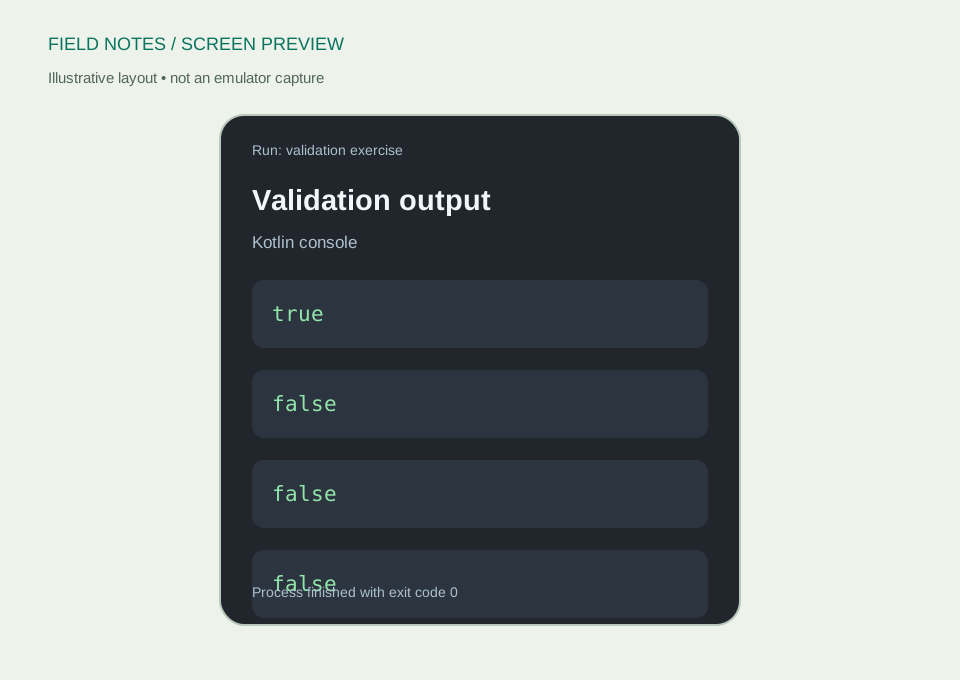
Try the validation function with a normal title, an empty string, whitespace only, and text beyond the limit. Write down your predicted result first. Prediction turns running code into a learning exercise instead of watching output without understanding why it appeared.
fun main() {
    println(isValidTitle("Learn state hoisting"))
    println(isValidTitle(""))
    println(isValidTitle("   "))
    println(isValidTitle("x".repeat(81)))
}
The expected sequence is true, false, false, false. If your result differs, inspect the actual input and function implementation. Do not immediately rewrite the whole rule. A small experiment gives you a clear place to investigate, and the same cases will become useful automated tests in the final lesson.
Treat missing information as a real case
A nullable type marks a value that may be absent. String? is different from String: the question mark makes absence visible in the type system. For an optional import title, choose a clear policy. You might replace missing or blank information with a label, or reject the record, depending on what the feature promises.
fun displayTitle(optionalTitle: String?): String {
    return optionalTitle
        ?.trim()
        ?.takeIf { it.isNotEmpty() }
        ?: "Untitled note"
}
The safe-call operator continues only when the value is present, and the Elvis operator provides the fallback. The result is always a non-null string. Resist adding !! simply to silence a compiler error; it asserts that a nullable value is present and can fail when your assumption is wrong. Explain why a value can be missing before choosing how to handle it.
Model one note with a data class
Related values belong together when they describe the same item. A data class gives Field Notes a small model whose properties have clear names. Start with a stable identifier, title, and completion flag. The practice identifiers below are manually assigned; a later persistence layer will define how new identifiers are created.
data class Note(
    val id: Long,
    val title: String,
    val done: Boolean = false
)

val original = Note(id = 1L, title = "Read the setup guide")
val completed = original.copy(done = true)
copy creates another instance with the selected property changed. It does not modify the original note. That behavior fits a screen that receives a new state and renders it. Keep the names Note and NoteEntity distinct later: a learning model and a database record can represent similar information while serving different layers of the application.
Ask questions about a collection
A list lets you work with several notes without creating a separate variable for each one. Use collection operations to express an intention, such as finding unfinished items or locating a specific identifier. These operations make the rule visible without introducing a complex loop before you need one.
val notes = listOf(
    Note(1L, "Read the setup guide", done = true),
    Note(2L, "Practice Compose"),
    Note(3L, "Test a blank title")
)
val unfinished = notes.filter { !it.done }
val selected = notes.firstOrNull { it.id == 2L }
The filtered list should contain two notes. The selected value is nullable because a requested identifier might not exist. Try searching for 99 and decide how a screen should handle that missing item. A deleted note is an ordinary condition in a real application, so the model should help you handle it rather than pretending it cannot happen.
Keep transformations separate from side effects
A transformation computes a result from input. A side effect changes something outside that computation, such as writing a file or updating a database. The title-validation function is easy to test because it does not depend on the clock, device, network, or screen. Preserve that simplicity wherever possible.
When adding Android behavior later, let the UI collect input and send an event to the appropriate owner. That owner can call the pure rule and then decide whether to save. Avoid putting database writes inside a function whose name suggests that it only formats a title. Names and boundaries help you predict what happens when the function is called again.
Practice without copying the answer
Add a function that returns the number of unfinished notes in a supplied list. Try an empty list, a list with every item complete, and a mixed list. Then change a note using copy and confirm that the original list remains unchanged unless you explicitly build another list containing the replacement.
You have finished this lesson when you can explain the validation result, handle a missing title, and find a note without forcing nullable values. Use Kotlin's basic syntax documentation to explore unfamiliar constructs. In the next lesson, we will display these ideas in Compose while keeping the screen's structure separate from the app's rules.