
A suspicious message often succeeds by creating a small moment of urgency. An account is supposedly closing, a delivery needs a fee, or a colleague asks you to open an unexpected document. The message wants you to act through the route it supplies before you verify whether the request makes sense.
You do not need to identify every technical detail to handle that moment well. Start by pausing the requested action and checking through a route you already trust. A polished logo, familiar sender name, or convincing tone is evidence about appearance, not proof of authority.
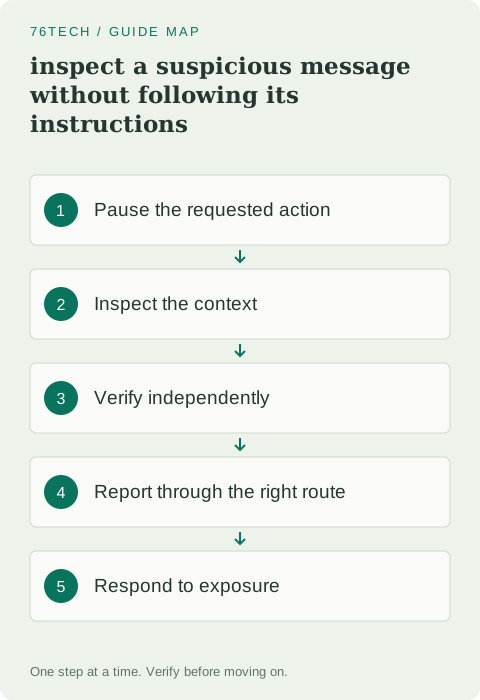
1. Identify the action the message wants
Read for the requested behavior: enter a password, approve a sign-in, download a file, change payment details, or send information. Consider the consequence before interacting. A harmless-looking “view document” link can lead to a login page whose real purpose is collecting credentials.
Ask whether you expected the request and whether it fits the sender's normal process. Urgency, secrecy, or pressure to bypass a routine is a reason to verify, but the absence of those signs does not establish legitimacy. Some harmful messages are calm and specific because they imitate ordinary work.
2. Inspect the sender and address carefully
Look beyond the display name to the actual sender address where the application shows it. Compare it with a known legitimate contact or the organization's official domain. Similar characters, extra words, and an unrelated domain can reveal a mismatch.
Do not rely on the sender field alone. Accounts can be compromised, and legitimate-looking messages can still contain an unexpected harmful request. If a real colleague suddenly asks for an unusual action, independent confirmation remains useful. The question is whether this particular request is authorized, not simply whether the name is familiar.
3. Verify without using the supplied route
Open the service through its official app, a saved bookmark, or an address you already know. Check whether the alleged account issue or document exists there. For a person, use an established phone number or conversation channel rather than replying to a new number provided in the suspicious message.
CISA's phishing guidance emphasizes recognizing and reporting suspicious attempts. Build the independent-route habit into normal work. A quick confirmation through the right channel is often easier than analyzing every visual detail of a fabricated email.
4. Treat links and attachments as actions
Where your mail client supports it, inspect a link's destination without opening it. Be careful on touch devices, where a gesture may navigate instead of previewing. A destination should be assessed as a full domain and context, not merely by whether it contains a familiar brand word somewhere in the path.
Do not upload a private attachment to an unknown analysis site just to ask whether it is safe. That can disclose its contents. Use the organization's approved reporting process or the service provider's legitimate tools. Keep sensitive documents within the access boundaries intended for them.
5. Never share sign-in codes to satisfy a message
A one-time code, recovery code, or sign-in approval can grant access even if it feels less permanent than a password. Do not send it to someone who claims they need it to fix your account. Approve only sign-ins you initiated and understand.
If a message says that sharing the code is the only way to stop an attack, verify through the service's official security interface. Attackers can frame the harmful action as protection. Slow down enough to identify who will receive the code and what action it authorizes.
6. Report through the appropriate process
On a work account, use the approved phishing-reporting feature or contact the security team. Preserve the message if the process asks you to, and avoid forwarding it widely to colleagues. The reporting route may need the original headers and attachment handling, which a casual screenshot cannot provide.
For a personal account, use the mail provider's phishing-report control and the impersonated service's official reporting instructions where relevant. Once reported, remove the message through the normal interface as appropriate. Do not keep interacting with it to collect more evidence if you already have enough to report the suspicious request.
7. Respond according to what was exposed
If you only opened a page, close it and avoid further interaction. If you entered a password, change it through the genuine service and review account security, sessions, and recovery details. Change other accounts where the same password was reused. If you approved a login or shared a code, treat that as possible account access and follow the provider's recovery guidance.
If you ran a downloaded file, contact the appropriate support or security team and follow its device-response procedure. Be precise about what happened rather than minimizing it as “just clicking.” The response depends on the action and data involved, so a clear account of events is valuable.
8. Make verification socially normal
For important requests, especially payment or access changes, use an agreed confirmation process. People should expect a quick check rather than interpreting it as distrust. That makes a forged urgent message less able to exploit politeness or pressure.
Keep your software and authentication protections current, but do not expect them to replace judgment about every request. The repeatable skill is recognizing the action, checking its context, and verifying independently. A suspicious message becomes much less powerful when it cannot choose both the story you hear and the route you use to confirm it.