
This course is for people starting programming and for developers who want a clear introduction to Kotlin. Across four foundation lessons, you will build the processing logic for a small study planner. You begin by printing a plan, then introduce variables, decisions, functions, and task collections. Each lesson includes a complete example, expected behavior, and an exercise you can finish independently. Work through the lessons in order because later examples build on ideas introduced earlier.
You do not need an Android project for these exercises. Learning how values move through a program first makes it easier to connect that logic to an interface later. Allow approximately thirty to forty-five minutes for this lesson, including experiments. The reading time shown on the website measures reading rather than practice. Your goal is to understand every line you write and to fix a simple mistake without replacing the whole program.
Prepare a place to run Kotlin
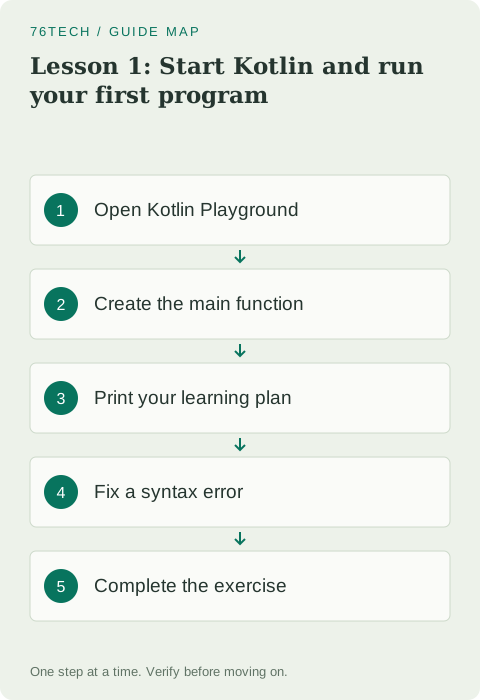
Open Kotlin Playground in your browser. It is suitable for the small examples in this course, which do not need additional libraries. Replace the sample in the editor with the program below and select Run. If you already use IntelliJ IDEA, you can instead create a Kotlin/JVM project and put the example in a Kotlin source file. Start with whichever option lets you concentrate on the code rather than project configuration.
Save a copy of each exercise somewhere you control. A browser tab should not be the only copy of your work. Names such as Lesson01.kt and Lesson02.kt make the sequence easy to follow. Each complete example has its own main function, so run examples separately. Pasting several examples into one file can create conflicting declarations and make an otherwise correct exercise fail before it runs.
Write the first program
fun main() {
    println("Hello, Kotlin!")
    println("Course: Kotlin foundations")
    println("Today's goal: run my first program")
}
The output contains three lines in the order shown in the source. The first line is Hello, Kotlin! The second identifies the course, and the third describes today's goal. println prints a value and then starts a new line. Quotation marks surround text, parentheses hold the value passed to the function, and braces mark the beginning and end of the function body.
Change the greeting to include your name, then run the program again. Notice that changing text in the editor does not change output from an earlier run. A fresh run is needed to produce fresh output. Keep this distinction in mind whenever you compare a result with your source: check that the result actually belongs to the version you are looking at.
Read main from the outside inward
The keyword fun declares a function. In this example, main is where execution begins. Its parentheses are empty because we are not declaring parameters. The statements between its braces execute when the program enters the function. You can think of the function as a named group of work, with each println call performing one smaller action inside that group.
Kotlin does not require a semicolon at the end of each line in these examples. Indentation helps readers see which statements belong together, even though braces define the block. Keep one printing statement per line and use consistent indentation inside main. Formatting is useful when you return to your work later or ask another person to help diagnose a problem.
Distinguish text from calculations
fun main() {
    println("20 + 25")
    println(20 + 25)
    println("Planned minutes: " + (20 + 25))
}
The first statement prints the characters 20 + 25 because they are inside quotation marks. The second prints 45 because addition happens before the result reaches println. The third joins a label with the calculated result and prints Planned minutes: 45. Parentheses around the addition make the order clear: calculate the total first, then attach it to the label.
Try multiplication instead of addition, but predict the result before selecting Run. Write your prediction beside the experiment and compare it with the actual output. If they differ, explain the difference while the example is still small. This habit tests your understanding instead of merely confirming that a program produced some output without an error.
Leave useful comments
A line beginning with // is a comment rather than an instruction to execute. Use comments to explain a decision or record an assumption behind an exercise. For example, noting that a total includes both reading and practice explains something useful. Writing “print the total” immediately above a clearly named printing statement adds little information for the next reader.
Keep comments consistent with the code. If a comment says an activity takes thirty minutes while the current calculation gives forty-five, a reader has to guess which is correct. Fix incorrect behavior first and update explanations afterward. Short examples are especially helpful because you can reread the entire program before each run and notice inconsistencies quickly.
Fix errors one change at a time
Remove the closing quotation mark from one string and run the program. The compiler cannot understand the unfinished string. Restore the quotation mark, run again, and confirm the error disappears. Next, replace println with Println. Kotlin distinguishes uppercase and lowercase letters, so that spelling does not name the same function. Restore the original spelling before continuing.
When several messages appear, start with the first relevant error near the line you changed. A missing delimiter can cause later lines to be reported incorrectly too. Make one repair and rerun rather than changing several unrelated lines. If compilation succeeds but the output is wrong, examine the text or calculation passed to the function instead of treating it as a syntax problem.
Complete the exercise
Write a program that prints the course name, the learner's name, and the total duration of two activities. Reading takes fifteen minutes and practice takes twenty-five. Calculate the final value with addition so the output contains 40; do not type that total as fixed text. Then change practice to thirty minutes and verify that the new total becomes 45 without editing the printing logic.
You have completed this lesson when you can recreate main without copying, explain why quoted arithmetic stays text, and repair a missing delimiter. In the next lesson, you will give the plan's values meaningful names so changes are easier to manage. Review the official introduction if you want another explanation of the program structure.