
In the first lesson, you printed information and performed arithmetic directly. As a study plan grows, numbers scattered through the source become harder to understand. This lesson gives the learner's name, target duration, and completed duration meaningful variable names. Types help describe what each value represents and prevent some mistakes before the program runs. You will also see why the order of a numeric conversion matters.
Run the examples in Kotlin Playground as before, and save this lesson separately. Keep only one main function in the example you are running. Before adding variables, try writing a statement that prints the sum of two numbers. If text and arithmetic still feel confusing, repeat that small experiment first. The new ideas are easier to follow when you already know what reaches the output.
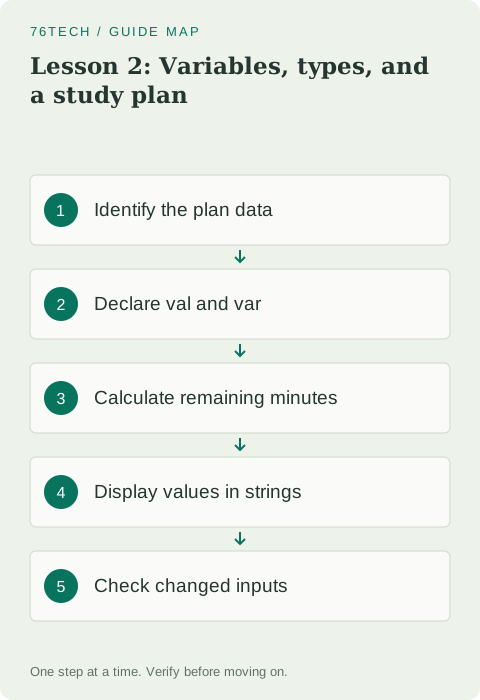
Decide which values to represent
Our plan needs a learner's name, a target number of minutes, the minutes already studied, and an indication of completion. A name is text, represented by String. These durations are whole minutes, represented by Int. Completion has two possibilities, represented by Boolean. Choose a type from the meaning of the value rather than choosing one type for everything because it is convenient to print.
Use short, descriptive names such as targetMinutes and studiedMinutes. Including the unit makes these names more useful than an ambiguous name such as duration. If a later version measures seconds, the source will show which calculations need attention. Keep the learner-facing wording readable too: internal variable names and output labels serve different purposes, even when both describe the same value.
Run a program with val and var
fun main() {
    val learner: String = "Alex"
    val targetMinutes: Int = 60
    var studiedMinutes: Int = 20
    studiedMinutes += 15
    val remainingMinutes = targetMinutes - studiedMinutes
    val completed: Boolean = studiedMinutes >= targetMinutes
    println("Learner: $learner")
    println("Studied: $studiedMinutes minutes")
    println("Remaining: $remainingMinutes minutes")
    println("Completed: $completed")
}
The output identifies Alex, reports 35 studied minutes and 25 remaining minutes, and shows Completed: false. The += operation adds fifteen to the existing studiedMinutes value. The comparison >= produces a Boolean. You do not need a conditional statement merely to calculate that flag: the comparison already expresses the question of whether study time has reached the target.
Understand reassignment
val declares a reference that cannot be reassigned after initialization. var permits reassignment. The name and target stay fixed during this run, so they use val. Studied time increases after another session, so it uses var. Prefer val when a value does not need reassignment, and introduce var where changing that value expresses an actual part of the program's behavior.
Try assigning a new value to targetMinutes and inspect the compiler message. Do not change every declaration to var just to remove the error. Decide whether the target genuinely needs to change or whether you need a new value calculated from the existing target. Later, remember that val does not make every referenced object immutable: a mutable collection can still change its contents.
Let Kotlin infer obvious types
Kotlin infers remainingMinutes from subtraction between two Int values. You can write the type explicitly if you want to emphasize it, but the operation is already clear in this example. Type inference reduces repetition while retaining type checking. It does not mean the value has no type or that the variable can freely switch between unrelated kinds of values during execution.
An Int does not automatically become a Double in every context where a floating-point number is needed. Explicit conversion makes a change in numeric representation visible. We keep minutes as Int and convert one operand when calculating a percentage. This avoids introducing floating-point values into all the duration variables when the underlying plan still uses whole minutes.
Check integer division
fun main() {
    val studiedMinutes = 35
    val targetMinutes = 60
    val integerRatio = studiedMinutes / targetMinutes
    val percent = studiedMinutes.toDouble() / targetMinutes * 100
    println("Integer ratio: $integerRatio")
    println("Percentage: $percent")
}
integerRatio is 0 because division between these integers discards the fractional part. percent is approximately 58.33 because conversion happens before division. The printed percentage may contain more decimal places; this example demonstrates arithmetic rather than a finished display format. Formatting for a user interface can be handled separately once you know the calculation produces the intended value.
Converting the result after integer division does not restore information already discarded. Dividing thirty-five by sixty first produces zero, and converting that zero gives 0.0. Also, the target must be positive before calculating a percentage. The next lesson introduces conditions to deal with invalid input explicitly instead of assuming every possible target makes sense.
Insert values into strings
A dollar sign followed by a variable name inserts that variable's value into a string, as the examples demonstrate with learner and studiedMinutes. For a more complex expression, Kotlin string templates allow a dollar sign followed by an expression enclosed in braces. Start with simple variables so the output line remains easy to read and the calculation can be inspected independently.
Change the learner's name and target, then run again. Every output line using those variables should reflect the new values. If one line still shows the old name, you may have typed fixed text there instead of referring to the shared value. Changing inputs is a practical way to check whether the source really represents data consistently rather than duplicating it in several places.
Practice with known results
Create a plan with a ninety-minute target and thirty minutes already studied. Add a twenty-five-minute session by updating the variable. Expect 55 studied minutes, 35 remaining minutes, and false for completion. Calculate the percentage by converting an operand before division. Then add another thirty-five minutes: the remaining time should become zero and completion should become true.
If studied time exceeds the target, simple subtraction can produce a negative remainder. Record that case for the next lesson rather than adjusting inputs to hide it. You are ready to continue when you can explain each type, choose val or var from the intended behavior, and predict integer versus floating-point division. Consult the official basic types tour for further examples.